Release Notes - Version v1.0.148
Last updated: August 18, 2025
This week, Fei is syncing better with your real-world workflow... and making a new friend: Jira. 🧙♂🤝📋
🧙♂ Jira Integration – Design Instructions, Now One Click Away
In the first phase of our Jira integration, you can now fetch product tickets directly from a Jira issue to use as your design and implementation instructions. This will enable more context for Fei to provide even better result, with no need to copy-paste or any phrasing.
Here’s how it works:
🔐 Connect your Jira account via OAuth
🔎 Add an issue by ID or URL
📝 The issue description will be used as your design and implementation instructions
🎨 If a Figma frame link is mentioned in the issue, the first frame mentioned will be added automatically
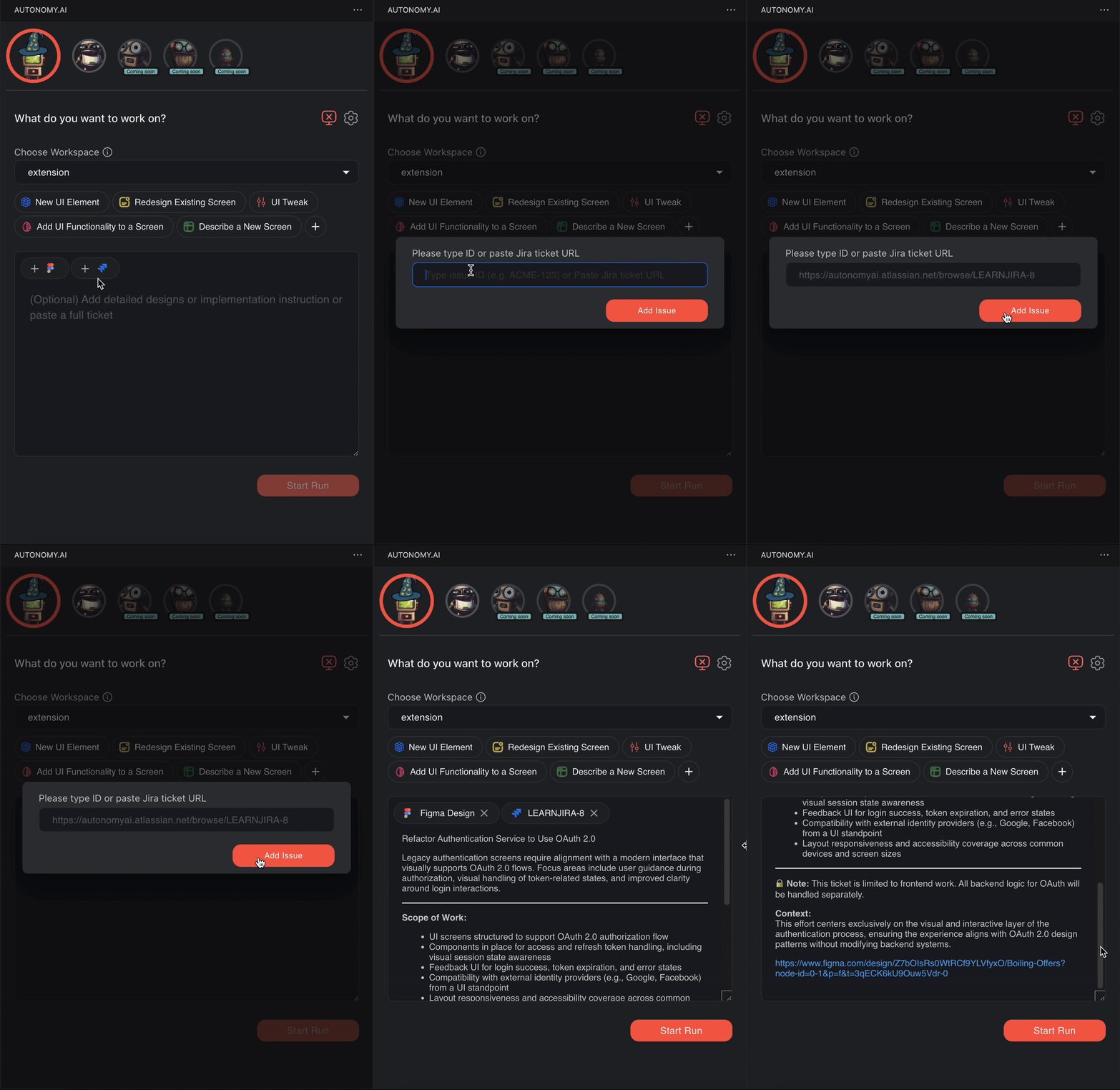
It’s the smoothest way yet to go from product ticket to working code - just bring your Jira, and Fei will take it from there.
Working with Jira? Contact us and we can we can help you set it up 💬
Working with Linear? We didn't forget about you, stay tuned ✨
🚨 P.S: After updating, please restart the Autonomy extension to apply the changes.
Click "Disable" → "Enable" in the Extensions tab or reload VS Code.
Thanks for using Autonomy - and helping it play nicer with your entire stack. 🚀