Enabling Autonomy AI in Github Codespaces - Admin Setup
Last updated: August 18, 2025
To ensure everyone in your organization -including non-developers like product managers and designers - can contribute to your frontend codebase, Autonomy’s Fei is now available in GitHub Codespaces.
With just a few setup steps, you’ll unlock a fully cloud-based, ready-to-code environment where users can run AI-powered UI tasks without needing to install anything locally.
1. Enable Codespaces for your selected audience
Go to Organization Settings > Codespaces.
This guide will walk you through configuring your repo so your team can launch Fei in one click.
See detailed steps: Enabling or disabling GitHub Codespaces for your organization
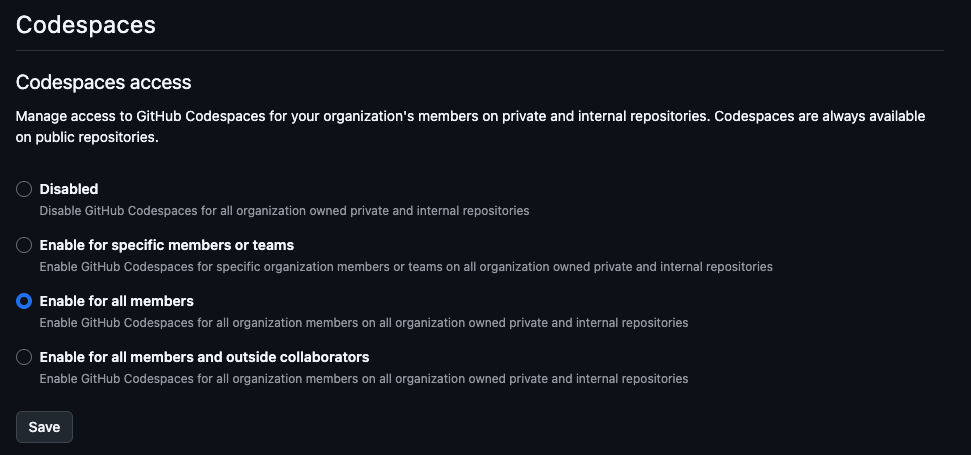
Under Codespaces access, choose one of:
Enable for specific members or teams.
Enable for all members.
Enable for all members and outside collaborators.
Save changes.
2. Decide who owns and pays for Codespaces
Go to Organization Settings > Codespaces.
See detailed steps: Choosing who owns and pays for Codespaces in your organization
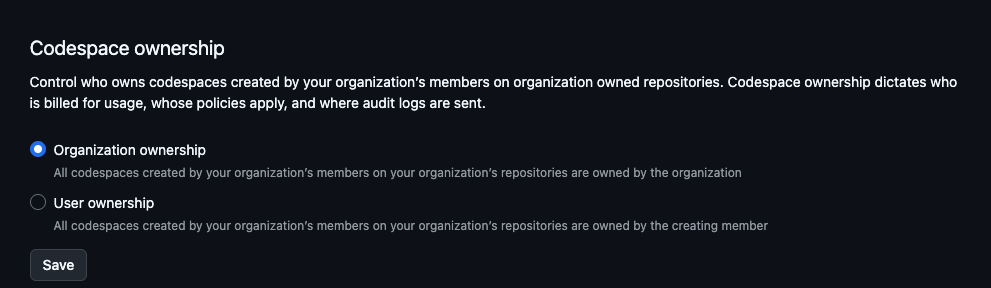
Choose between organization ownership or user ownership (each member covers their own Codespaces costs).
If you chooe the organization ownership option, ensure a payment method is set up.
3. Set a Budget Limit
Go to Organization Settings > Budgets and alerts
Important: Codespaces usage is blocked if the spending limit is reached.
Set a non-zero limit to prevent accidental free usage caps.
More info: Choosing who owns and pays for Codespaces in your organization
4. Preinstalling the AutonomyAI Extension (Recommended)
To make it easier for your users to use Autonomy’s extension without installing it on each Codespace, you can add the Autonomy extension to the
.devcontainer/devcontainer.json, by adding this section:
"customizations": {
		"vscode": {
			"extensions": [
				"autonomyai.autonomy-ai"
			]
		}
	},
5. Additional Recommended Configurations (Optional)
Retention policy: Configure how long inactive Codespaces are kept.
Machine types: Restrict available VM sizes to control costs.
Repository access: Limit which repos can launch Codespaces.