ACE Troubleshooting Guide
Last updated: June 13, 2025
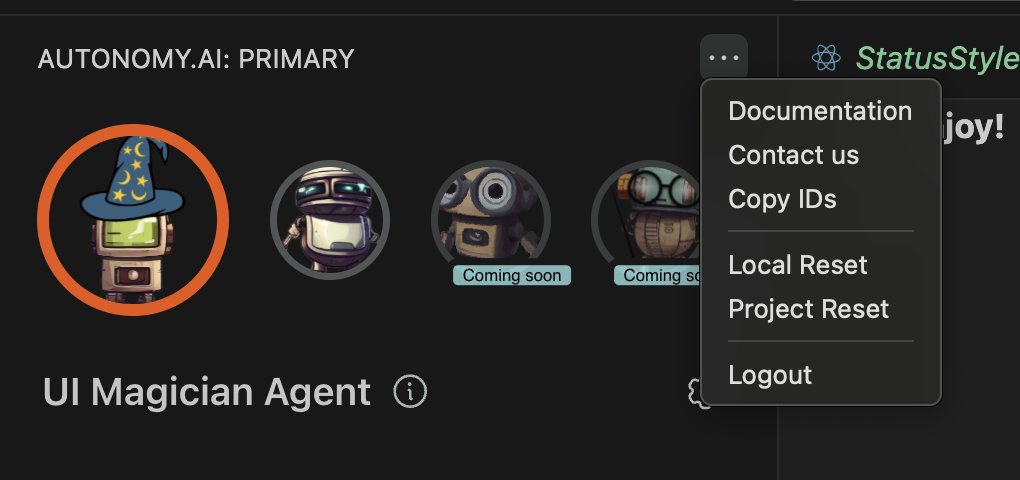
This guide outlines key recovery tools available in the ACE environment when issues arise, particularly after changes to your project structure, repository, or team usage patterns.
🔄 Local Reset
What it does:
A Local Reset clears and rebuilds ACE’s internal mapping of your files and functions, with a focus on file locations and paths.
When to use it:
After merging branches.
When switching between branches.
If file paths appear incorrect or ACE isn’t recognizing recently moved or renamed files.
Why it's helpful:
Sometimes, the local context ACE holds can become stale or inconsistent during typical Git operations. A local reset ensures that your current workspace aligns precisely with your codebase's structure.
🌐 Project Reset
What it does:
A Project Reset clears ACE’s semantic understanding of your project that is shared across the entire team. It’s essentially a system-wide knowledge refresh.
When to use it:
If your team hasn’t used the project in a while.
After a significant update to the repo modeler (i.e., we’ve improved how ACE understands repositories and semantic links).
If ACE responses feel outdated or misaligned with recent structural or naming changes.
Why it's helpful:
Over time, semantic models can become outdated. A project reset ensures ACE uses the most accurate, updated understanding of your codebase, improving relevance and team-wide consistency.